FileApex icon New and moving fast

Your devices.
One file manager.

Pair your phone, Mac and PC once. Then browse each other's files, send in a tap, share the clipboard and see your phone's notifications on your computer. Files go straight between your devices, with no cloud in the middle.

Free and open source (MIT) 路 Android 路 macOS 路 Windows 路 Linux

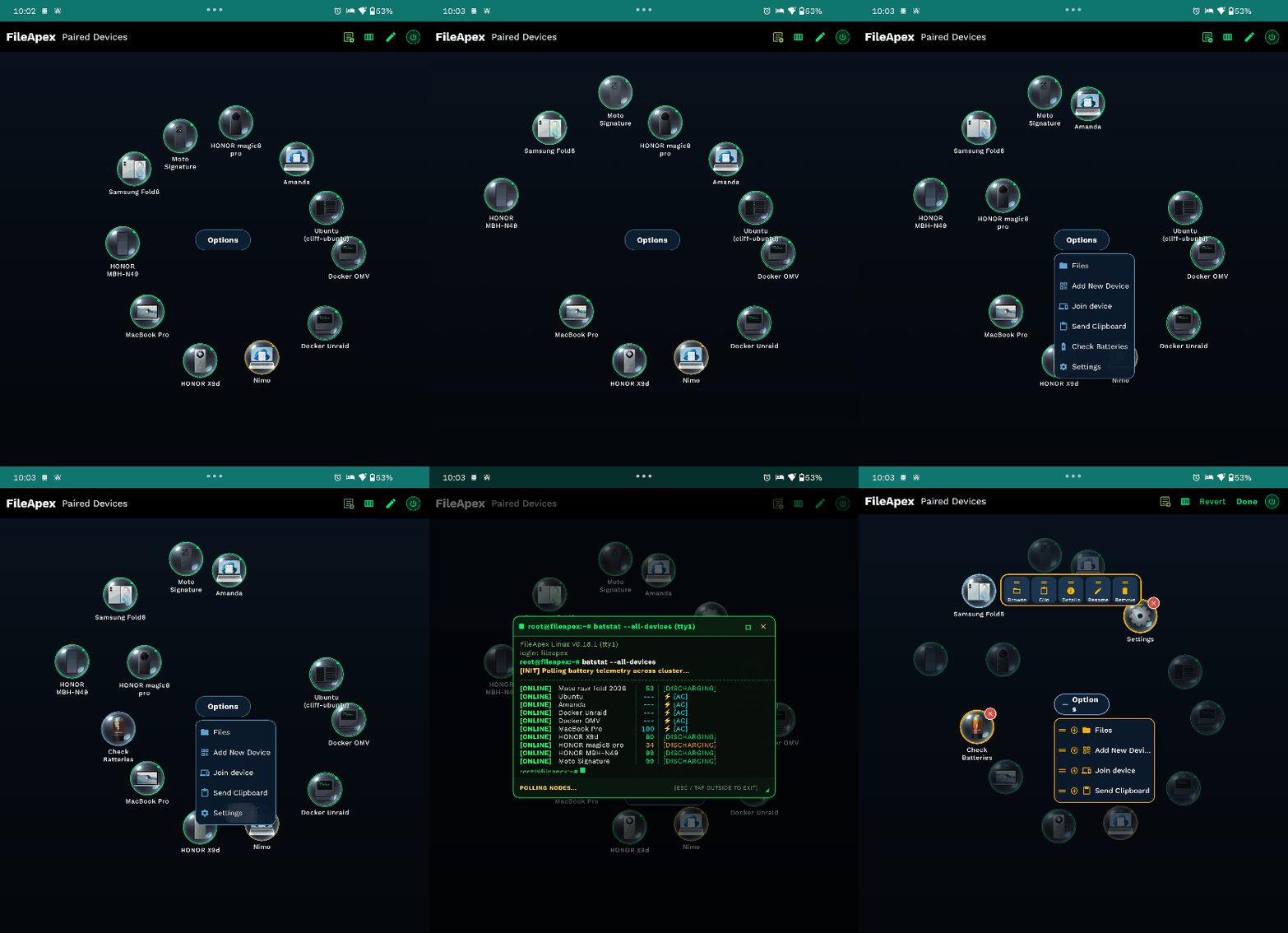
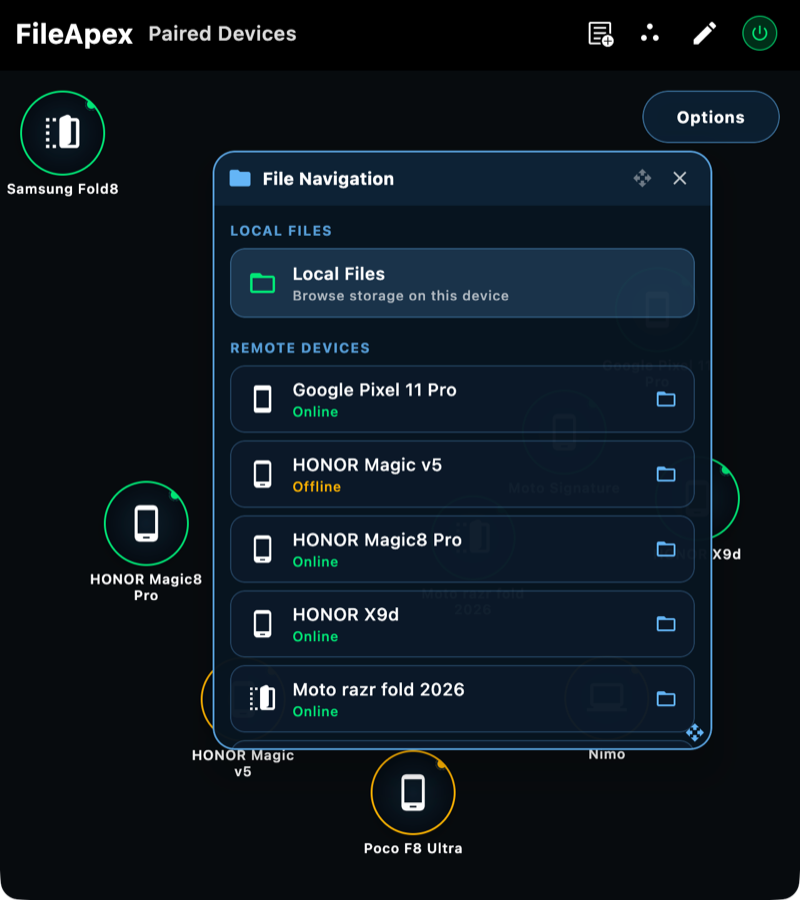
FileApex showing paired devices in an orbital layout with the file navigation panel open
How it works

Set up once, then forget it

No typing IP addresses, no accounts, no pasting links to yourself.

Pair

Show a QR code on one device and scan it on another, or type the 6-digit code. An optional PIN protects pairing and browsing.

Browse

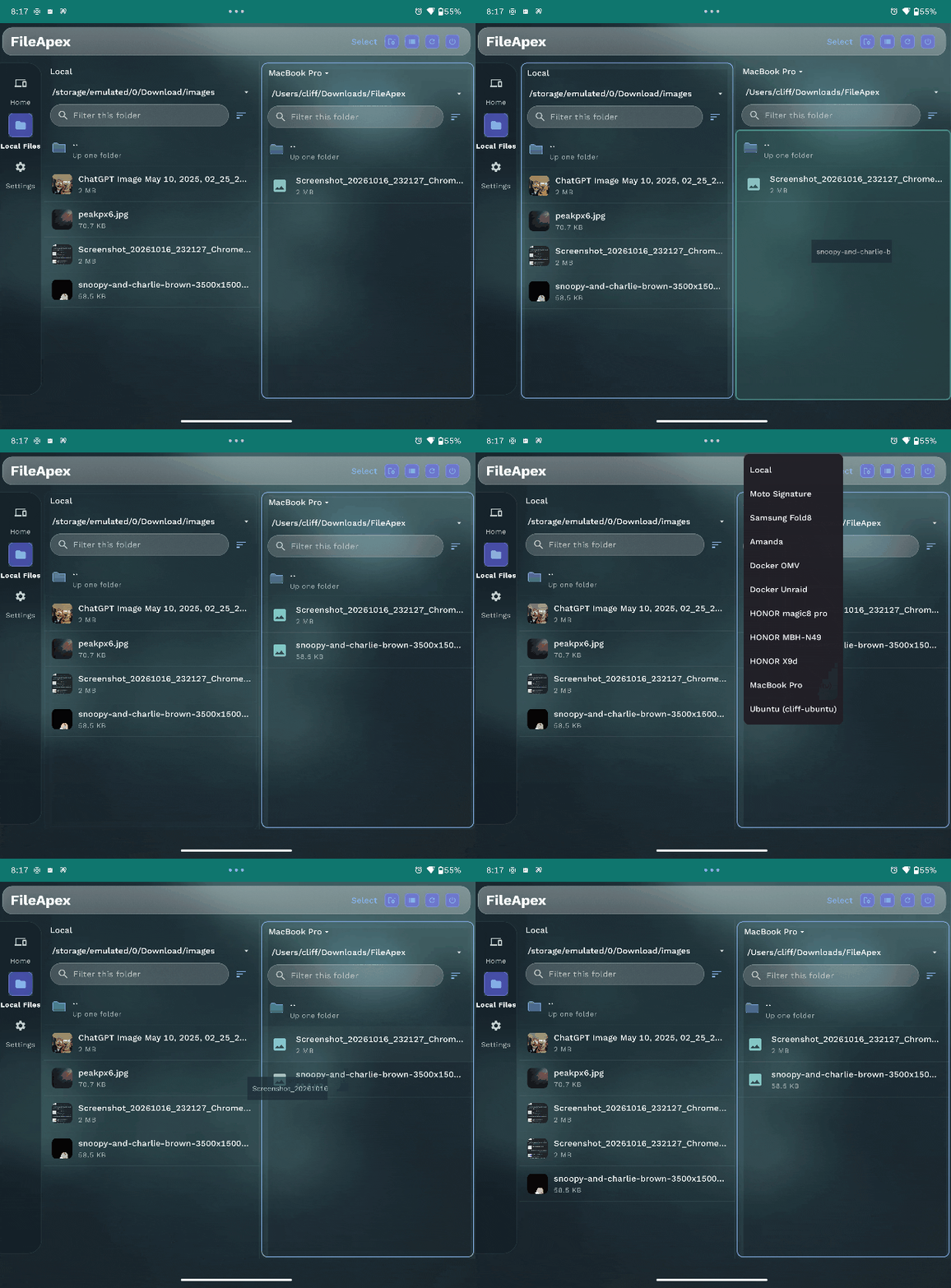
Tap a device to open its files. Copy, paste, preview and send to one or many devices at once.

Stay in touch

Clipboard, messages and phone notifications flow between your devices, and the receiving app wakes up on its own.

Features

Everything between your devices

The best parts of a file manager, a clipboard sync and seeing your phone notifications (on desktop), in one app.

馃搧

Local-first explorer

Browse and move files between paired devices on the same network. Incoming files land in a dedicated FileApex folder and never overwrite what you have.

馃殌

Send to many

Push files and folders to several online devices at once, from the app or from the Finder, Windows or Android share menu.

馃搵

Clipboard sharing

Opt in, then send your clipboard or a link to any paired device in any direction. Links open in the default browser.

馃搶

Bulletin Board

Send a note, link or file to all your devices at once, like a group chat with yourself. Delete it on one device or all, and the notification disappears too.

馃敂

Phone notifications on your computer

Choose which phone apps share notifications. Reply to messages or dismiss them from your computer. Verification codes stay on the phone by default.

馃搷

Find my phone

Lost it in the couch? Make a paired phone ring loudly from your computer.

馃攱

Device details

Battery, charging state, processor, storage, RAM and network for every paired device, plus a low-battery alert on the board.

鈱笍

Command line

A CLI and terminal dashboard on desktop for scripting and headless use, and a browser extension that sends the active tab to your board.

馃帹

Themes that fit you

Simple, Clean, Flux Glass, Kinetic Sphere and Freestyle. Simple is the default and is built for one phone and one computer.

Simple, the default look

Built for one phone and one computer

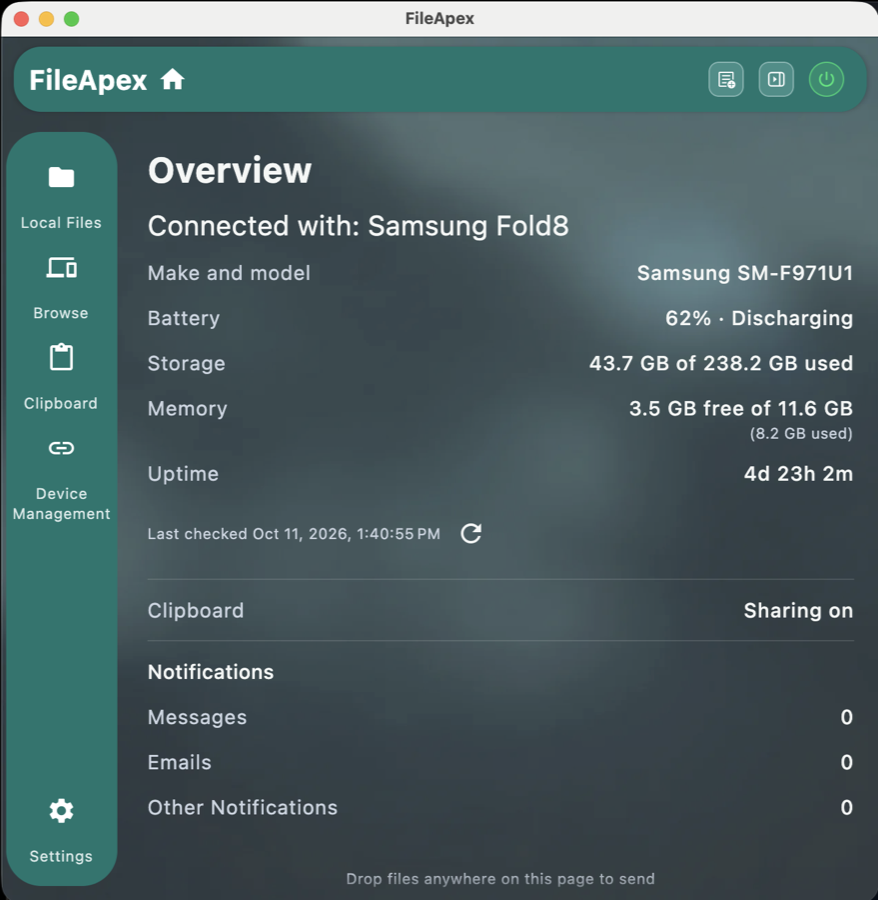
Most people pair a phone with a computer. The Simple layout puts that one device front and center: a live overview of its battery, storage and memory, and a left menu to browse its files, share the clipboard and manage devices. Drop files anywhere on the page to send them.

FileApex on a Mac, Simple layout: overview of a connected Samsung phone with battery, storage, memory and notification counts
The overview of your connected phone
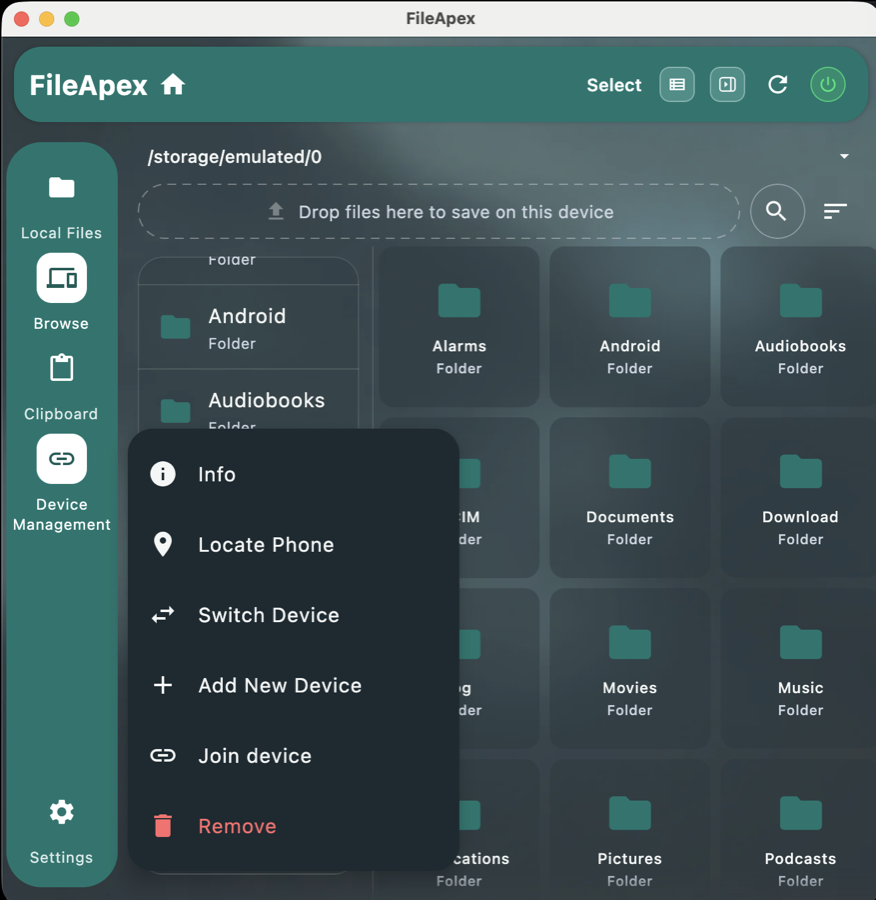
FileApex on a Mac browsing a phone's folders, with a menu showing Info, Locate Phone, Switch Device and Add New Device
Browse its files and manage the device
Bulletin Board

Send it once, get it everywhere

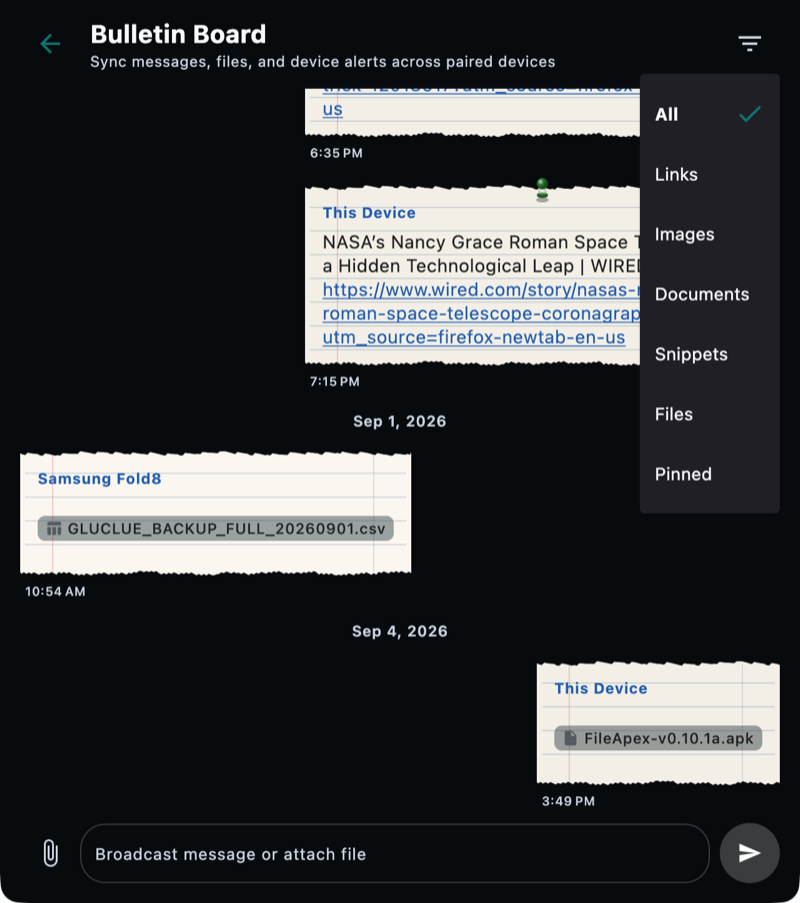
The Bulletin Board is a shared message feed across your devices. Write a note, paste a link or attach a file on one device and it appears on all the others. Filter by links, images, documents, snippets, files or pinned posts.

  • Sticky notes, torn ledger, iOS and Material styles
  • Delete on this device or on all of them
  • Reaches Android devices on cellular when you opt in to a Google account
The Bulletin Board with torn-ledger notes and a filter menu
Look and feel

Make it yours

Pick the theme and layout that suits the device in your hand. Phones get bottom navigation, tablets and unfolded foldables get a side rail, and desktops can go compact or expanded.

  • Simple (default), Clean, Flux Glass, Kinetic Sphere, Freestyle
  • Windows 11 modern chrome on Windows
  • Changes apply instantly
The Themes settings page with Clean, Flux Glass, Kinetic Sphere and Freestyle
Networking and privacy

Your network first. The internet only if you say so.

File contents stay on your devices. FileApex has no ads, no trackers and no analytics.

馃摱

Same network

Discovery and transfer over Wi-Fi or Ethernet once devices are paired. Nothing leaves your home.

馃寪

Tailscale

Reach paired devices across networks through your own tailnet.

馃惓

Docker node

Run the FileApex daemon as an always-on device for a NAS or home server.

鈽侊笍

Google account (opt in)

Cloud presence, wake signals and an optional Drive relay for Bulletin Board files when a device is off Wi-Fi. Relay files are end-to-end encrypted.

馃敀

PIN lock

Require a PIN to pair and to browse files. Sending files to a device never needs the PIN.

馃摉

Open source

MIT licensed. Read the code, and read the privacy policy that explains every permission.

馃Л

Iroh In testing

A new, optional way to reach your devices when they are not on the same network. Devices connect directly and encrypted using their keys, and fall back to a relay only when a direct path is not possible. The relay only ever sees encrypted data. You can run your own relay on a free cloud server, or use the public ones. Switch it on under Settings > Iroh. It does not need Google or a Tailscale account, and it is still experimental, so expect changes.

Download

Get FileApex

Install it on two devices and pair them. That is the whole setup.

馃

Android

Google Play or the APK

Google Play

Or get the APK

馃崕

macOS

Apple Silicon and Intel

Download
馃獰

Windows

Installer

Download
馃惂

Linux

.deb, .rpm or AppImage

Download
馃

Firefox extension

Send a tab to your board

Download

Apps from GitHub can check for updates and install them from inside the app (opt in). Play builds update through Google Play.

FAQ

Good questions

Is it free?

Yes. FileApex is free, open source under the MIT license, and has no ads.

Does it need an account or internet?

No. Pairing and transfers work on your local network. A Google account, Tailscale and the Drive relay are optional extras for reaching devices that are off your network.

Where do received files go?

Into a FileApex folder: Download/FileApex on Android and ~/Downloads/FileApex on desktop. An existing file is never overwritten; a copy gets a number like name (1).ext.

Does it work on iPhone?

Not yet. FileApex runs on Android, macOS, Windows and Linux today.

Is the project finished?

It is new and changing quickly. Expect rough edges, and tell us about them on GitHub.